GCP Secret Manager
Google Cloud Secret Manager can be added as a secret provider in Plakar Control
Plane by selecting gcp as the integration type when creating a new secret
provider.
flowchart TB
  subgraph Plakar["Plakar Control Plane"]
    App["Any configuration field
(passwords, keys, certs, ...)"]
  end

  SA["Service account
(attached to the instance or provided as a key)"]
  SM["GCP Secret Manager"]

  App -->|"authenticate via"| SA
  SA -->|"read secret"| SM
  SM -->|"secret value"| App
Authentication
Plakar Control Plane authenticates to Secret Manager as a Google Cloud service account. The service account can be provided in two ways:
- Attached service account: when Plakar Control Plane runs on a Compute
Engine instance with a service account attached, no credentials need to be
provided. The secret provider uses the instance’s service account
automatically. The instance must use the
cloud-platformaccess scope, shown as Allow full access to all Cloud APIs in the Google Cloud Console, as described in the Google Cloud installation guide. - Service account key: when Plakar Control Plane runs outside Google Cloud, or when a different identity is needed, provide a service account key in the Credentials Json field.
For more information on creating service accounts, generating keys, and attaching a service account to an instance, see Managing IAM Roles and Service Accounts.
Configuration
When adding the secret provider, you must provide a name for the secret provider. The remaining fields are optional and depend on how Plakar Control Plane is deployed and where your secrets are stored.
-
Credentials Json: The service account key, in JSON format. Leave empty to use the service account attached to the Plakar Control Plane instance.
-
GCP Location: The location of regional secrets, for example
europe-west1. Leave empty for global secrets. When set, the secret provider reads secrets from that location using the regional Secret Manager endpoint. -
Endpoint: A custom Secret Manager API endpoint, for example when access goes through Private Service Connect. Leave empty to use the default endpoint, or the regional endpoint when Gcp Location is set.
-
Use Rest Client: Uses the Secret Manager REST API instead of gRPC. Enabled by default. Disable it only if your network or endpoint requires gRPC.
Google Cloud Secret Manager supports two kinds of secrets: global secrets, which are replicated according to their replication policy, and regional secrets, which are stored in a single location. A secret provider reads either global secrets or the regional secrets of one location, depending on Gcp Location.
Required Permissions
The service account used by the secret provider needs the
secretmanager.versions.access permission on the secrets it reads.
For more information on creating a custom role with this permission and assigning it to a service account, see Managing IAM Roles and Service Accounts.
Creating Secrets
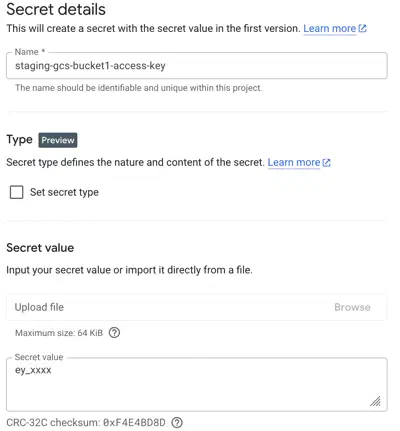
In Secret Manager, a secret holds a single value. Each credential used by Plakar Control Plane, such as a password or an access key, is therefore stored in its own secret.
When creating the secret, choose between a global and a regional secret. A
regional secret requires the matching location to be set in Gcp Location on
the secret provider. As an example, the access key of a Cloud Storage bucket
might be stored in a secret named staging-gcs-bucket1-access-key.
Secret Path Format
The path format used by Plakar Control Plane is:
{project_id}#{secret_name}The path format is the same for global and regional secrets. Using the example
above, in a project named my-project:
my-project#staging-gcs-bucket1-access-keyUsing Secrets in Plakar Control Plane
Once GCP Secret Manager is configured as a secret provider, you can use it in any form field that requires a credential. Switch the field from direct value to secret provider, select your secret provider from the dropdown, and enter the path to the secret you want to use.
