Webhook Setup
A webhook delivers Plakar Control Plane events to an external HTTP endpoint. Each event is sent as an HTTP request to a target URL, so an external system can react to activity in the organization without polling Plakar Control Plane. Webhooks are configured per organization, from the organization settings.
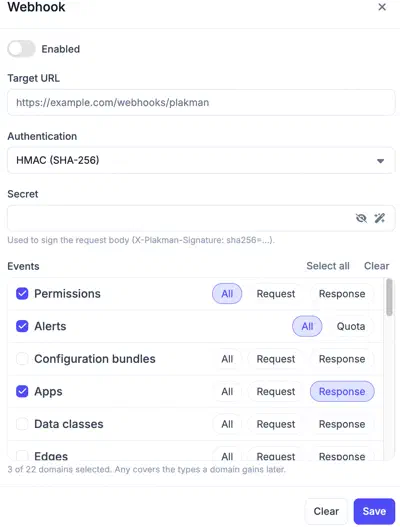
Delivery
The Enabled switch controls whether webhook requests are sent. While it is off, Plakar Control Plane sends no webhook requests, regardless of the rest of the configuration.
The Target URL is the endpoint that receives the requests. It must be reachable from the Plakar Control Plane instance.
Authentication
The authentication method determines how the receiving service verifies that a request comes from Plakar Control Plane.
- None: Requests are sent without authentication.
- Shared Key: The secret is included in the
Authorizationheader of every webhook request. - HMAC (SHA-256): The secret is used to sign the request body. The signature
is included in the
X-Plakman-Signatureheader using the formatsha256=..., so the receiving service can verify the integrity and authenticity of the request.
The signature is computed over the raw request body. The following example Python function can be used to verify it:
import hashlib
import hmac

def verify(secret: bytes, body: bytes, signature: str) -> bool:
  expected = "sha256=" + hmac.new(secret, body, hashlib.sha256).hexdigest()
  return hmac.compare_digest(expected, signature)
Event selection
Events are grouped into domains that follow the areas of Plakar Control Plane. Only events of the selected types are delivered to the target URL.
Each domain exposes its own event types. Most domains have a Request and a Response type. The Alerts domain has a single Quota type. For each domain, either select specific event types or select All to receive every event type in that domain.
The available domains are:
- Access: Groups, Invitations, Organizations, Permissions, Users.
- Infrastructure: Edges, Environments, Integrations, Inventories, Mounts, Network interfaces, Resources, Secret providers.
- Backup operations: Apps, Configuration bundles, Restore points, Runs, Schedules.
- Governance: Alerts, Data classes, Policies, Settings.