Edges
By default, Plakar Control Plane (PCP) runs scheduled operations from the Control Plane appliance. This works well when the resources you want to protect are reachable from the appliance.
For environments where resources are spread across different networks, or where the Control Plane should not have direct access to them, you can run operations through an edge.
An edge is a lightweight executor that runs in the environment where the resources you want to protect are located. It connects to PCP, receives work from the Control Plane, performs the operation locally, and reports the result back.
This lets the Control Plane coordinate protection without needing direct connectivity to every source and destination.
When to use an edge
An edge is useful when the systems being protected are not directly reachable from the Control Plane, when it is more efficient to run the operation close to those systems, when the appliance on its own cannot keep up with the work, or when an integration needs tools that the appliance does not carry.
For example, you might deploy an edge inside a datacenter containing virtual machines and databases, while the Control Plane runs elsewhere. The edge can then access those resources locally without exposing them to the Control Plane network.
Edges are also how a deployment scales. Every operation an edge runs is work the appliance does not run itself, so adding edges increases how much protection a single deployment can carry out at once, without resizing the appliance.
Edges are particularly useful for:
- Protecting resources behind private networks, firewalls, or NAT gateways.
- Running operations close to the data to reduce unnecessary network traffic and latency.
- Distributing work across multiple executors so that protection scales beyond what one appliance can run.
- Keeping the Control Plane isolated from networks containing protected resources.
- Running the few integrations that depend on external tools, which can be installed on the edge host.
An edge belongs to the organization it enrolled into. That organization can run tasks on it, and so can the organizations below it that inherit its edge enrollment setting. See Sharing edges with child organizations.
Architecture
The Control Plane remains responsible for coordinating protection. It schedules operations, manages inventories, stores metadata, and resolves the secrets required to perform a task.
The edge is responsible for executing the operation. It connects to the Control Plane and accesses the source or destination from its own network.
A deployment can contain multiple edges in different environments:
flowchart LR
  PCP["Plakar Control Plane"]

  subgraph Site1["Datacenter A"]
    Edge1["Edge"]
    VM1["Virtual Machines"]
    DB1["Databases"]
  end

  subgraph Site2["Remote Office"]
    Edge2["Edge"]
    NAS["NAS"]
    Files["File Servers"]
  end

  PCP -->|Assign task| Edge1
  PCP -->|Assign task| Edge2

  Edge1 --> VM1
  Edge1 --> DB1

  Edge2 --> NAS
  Edge2 --> Files
The important part of this architecture is that the Control Plane does not need direct access to the protected resources. It only needs to communicate with the edges. Each edge must be able to reach both the Control Plane and the resources it is responsible for.
How an edge works
An edge is enrolled once with the Control Plane. During enrollment, PCP gives the edge an authentication token that it stores locally.
After enrollment, the edge maintains its connection to PCP by polling for work. When a scheduled operation is assigned to it, PCP provides the information and secrets required to perform the operation. The edge then connects directly to the source, store or destination, performs the operation, and reports its status to PCP.
A task runs through an integration, such as the S3 integration when backing up an S3 bucket. The edge installs the integrations its tasks need from the Control Plane, not from the internet, so an edge never needs internet access to obtain them.
While a task runs, the edge streams its progress back to PCP. The
job details of a task run on an edge
therefore show the same information as for a task run on the Control Plane:
progress, resource and network graphs, recent paths, and output. The output
carries what the task writes to stderr, along with the output of its
pre-job and post-job hooks.
sequenceDiagram
  participant Edge as plakar-edge
  participant PCP as Plakar Control Plane
  participant Target as Source / Destination

  Note over Edge,PCP: One-time enrollment
  Edge->>PCP: Register with enrollment key
  PCP-->>Edge: Authentication token

  Note over Edge,PCP: Task execution
  PCP->>Edge: Assign task
  PCP-->>Edge: Resolve and provide required secrets
  Edge->>PCP: Install required integration
  Edge->>Target: Execute operation locally
  Edge-->>PCP: Stream progress and output
  Target-->>Edge: Result
  Edge-->>PCP: Report task status
Because the edge initiates communication with PCP, you do not need to expose an edge to inbound connections from the Control Plane. This also makes it suitable for environments where inbound connectivity is restricted.
Requirements
An edge needs network access to two things:
- The Plakar Control Plane, over HTTP or HTTPS.
- The systems and services it is expected to protect.
The Control Plane itself does not need network access to those systems. The edge provides that connectivity when it executes a task.
An edge installs integrations from the Control Plane, so reaching PCP is all it needs to run any integration installed there. It only needs internet access if the systems it protects are on the internet. The exception is the external tools some integrations depend on, described below, which must be installed on the edge host separately.
Integrations that need external tools
Most integrations are agentless. They communicate directly with the resource they manage and do not require additional software on the machine running the task. For example, the Windows VSS integration connects to the Windows host over SSH and needs nothing on the edge beyond the SSH client described in SSH keys.
Some integrations such as MongoDB, PostgreSQL and MySQL instead rely on
utilities provided by the vendor. These utilities must be installed on the
machine that executes the task. The
MongoDB integration, for example, uses
mongosh, mongodump, and mongorestore, which must be available in the
PATH of the process running the task.
These utilities are not included in the appliance, and the appliance is not intended to be extended with additional software. Tasks that require external tools should therefore run on an edge where the required tools can be installed.
Install the tools required by the integration on the edge host, then configure the task to run on that edge. As deployments grow, edges can be equipped with different sets of tools so that workloads can be distributed to the machines capable of running them.
SSH keys
Some integrations, such as SFTP and
Windows VSS, authenticate over SSH with a private
key. The edge loads that key into its own SSH agent, which runs for as long as
the edge does. The OpenSSH client (ssh, ssh-add and ssh-agent) must
therefore be installed on the edge host.
An edge without ssh-agent still starts and logs a warning. Tasks that
authenticate with an SSH private key fail on that edge, and every other task
runs normally.
Enable edge enrollment
Before an edge can join an organization, edge enrollment must be enabled for that organization. Enrollment is disabled by default.
New edges authenticate using an enrollment key generated by the Control Plane. The key is used when an edge connects to PCP for the first time and exchanges it for an authentication token.
You work with the edges available to the organization you signed in to, and what you can do with them is determined by the permissions your application user has on the organization.
To enable enrollment, open the organization’s settings and enable Edge enrollment under Settings -> Organizations -> [your organization] -> Settings. Enable it for the organization where the new edge should be registered.
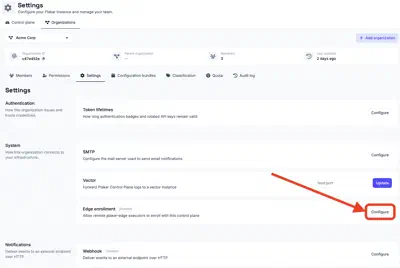
Keep enrollment enabled while you are adding edges. Once an edge has successfully enrolled, it no longer depends on the enrollment setting. PCP has issued it an authentication token, which the edge stores locally and uses for subsequent connections.
You can therefore disable edge enrollment after you have finished registering your edges. Disabling enrollment prevents new edges from joining the organization, but does not affect edges that are already enrolled.
If you need to add another edge later, enable enrollment again before starting its first connection to PCP.
You can regenerate the enrollment key at any time. If you regenerate it, use the new key when enrolling subsequent edges.
Sharing edges with child organizations
An organization shares its edges with the organizations below it by handing down its edge enrollment setting. Every organization that inherits the setting, at any depth, can use the edges of the organization that set it. The setting is inherited like any other organization setting, as described in handing settings down.
A shared edge runs tasks like one of the organization’s own. It appears in the organization’s list of edges, tasks can be pinned to it, and PCP can pick it when it selects an edge for a task. Only the organization that enrolled the edge can manage it.
An organization gets edges from one organization above it at most: the one it inherits the edge enrollment setting from. For example, the root organization hands the setting down, and organization A below it sets its own and hands that down too. Organization B below A then uses A’s edges along with its own, but not the root organization’s.
The edges are shared for as long as the setting is inherited, whether or not enrollment is enabled in it. Disabling enrollment only stops new edges from joining.
An edge joins the organization that owns the enrollment key it presents. An edge enrolled with an inherited key therefore joins the organization that handed the setting down, even when it was set up for an organization below. An organization enrolls edges of its own by setting its own edge enrollment value. A locked setting prevents this, so the organizations below share the edges of the organization that locked it and cannot enroll any of their own.
Installing an edge
An edge can run either as a standalone binary or as a Kubernetes workload. Choose the deployment method that best fits the environment where the edge will run.
Build plakar-edge
The standalone edge is currently built from source. The source code is available in the PlakarKorp/plakar-edge repository.
Build it with:
$ make
# OR
$ go build -o plakar-edge .
Prebuilt binaries will be provided in a future release, and edge functionality
will eventually be integrated directly into the plakar CLI.
Enroll the edge
Start the edge with the Control Plane URL, enrollment key, and organization it should join:
$ plakar-edge \
  -control-plane https://plakman.example.com \
  -enroll <enrollment-key> \
  -organization <organization-id> \
  -name edge-paris-1 \
  -tags env:prod,zone:eu-1 \
  -state-dir /var/lib/plakar-edge \
  -pkg /var/lib/plakar-edge/pkgs
The enrollment key and organization are only required for the first startup. After successful enrollment, the edge stores its identity and authentication token in its state directory and reuses them on subsequent starts.
For subsequent starts, you can therefore run:
$ plakar-edge \
  -control-plane https://plakman.example.com \
  -name edge-paris-1 \
  -tags env:prod,zone:eu-1 \
  -state-dir /var/lib/plakar-edge \
  -pkg /var/lib/plakar-edge/pkgs
Configure the edge
The most important options are:
| Option | Required | Description |
|---|---|---|
-control-plane |
Yes | Base URL of the Plakar Control Plane. |
-enroll |
First run | Enrollment key used to register the edge. It can also be provided through PLAKAR_EDGE_ENROLL_KEY. |
-organization |
First run | Identifier of the organization the edge joins. It can also be provided through PLAKAR_EDGE_ORGANIZATION. |
-name |
No | Name displayed for the edge in PCP. Defaults to the hostname. |
-tags |
No | Comma-separated tags reported by the edge on each poll. Tags can be used to target work to matching edges. |
-state-dir |
No | Directory used to store the edge identity and authentication token. Defaults to /var/lib/plakar-edge. |
-pkg |
No | Directory used for downloaded connector packages. Defaults to <state-dir>/pkg. |
-max-parallel |
No | Maximum number of tasks the edge runs concurrently. Defaults to 5. |
-poll-hold |
No | Expected server-side long-poll duration. Defaults to 30s. |
-listen |
No | Address of the supervision HTTP server. Defaults to 127.0.0.1:9877. Set it to an empty string to disable the server. |
-metrics |
No | Enables the Prometheus /metrics endpoint. Defaults to true. |
-scripts-dir |
No | Directory holding the hook scripts tasks may run. Empty by default, which refuses every hook. |
-max-parallel caps how much work one edge takes on at a time. Tasks assigned
beyond that limit wait until a running one finishes.
Tags are useful when you have multiple edges and want PCP to select an edge based on its environment. For example:
env:prod,zone:eu-1An edge can report multiple tags. See Selecting an edge for how PCP matches them when assigning work.
Deploy the edge
Each release provides a container image and Helm chart:
ghcr.io/plakarkorp/plakar-edge
oci://ghcr.io/plakarkorp/charts/plakar-edge
The Helm chart runs each edge as an independent StatefulSet replica. Each replica receives its own identity when it enrolls with the Control Plane.
The edge stores its identity and package cache on persistent storage. This is important because restarting a pod should not cause it to enroll as a new edge.
Each replica also has a stable hostname, which is used as its edge name by default.
Store the enrollment key
Store the enrollment key in a Kubernetes Secret rather than putting it directly in the Helm values:
$ kubectl create secret generic plakar-edge-enroll-key \
  --from-literal=enroll-key=<enrollment-key>
The chart references the Secret by name, keeping the enrollment key out of
values.yaml, rendered manifests, and Helm history.
Install the chart
For example, to run three edges:
$ helm install my-edges oci://ghcr.io/plakarkorp/charts/plakar-edge \
  --set controlPlane=https://plakman.example.com \
  --set organization=<organization-id> \
  --set enrollKey.secretName=plakar-edge-enroll-key \
  --set replicaCount=3
Each replica enrolls independently and appears as a separate edge in the Control Plane.
Without --version, Helm installs the latest published chart. To pin a release,
specify the chart version:
--version <version>The chart automatically uses the image version associated with the selected chart release.
Configure the chart
The main values for an edge deployment are:
| Value | Default | Description |
|---|---|---|
controlPlane |
"" |
Base URL of the Plakar Control Plane. Required. |
organization |
"" |
Identifier of the organization the edges should join. Required. |
enrollKey.secretName |
"" |
Existing Secret containing the enrollment key. Required. |
enrollKey.secretKey |
enroll-key |
Key containing the enrollment key inside the Secret. |
replicaCount |
1 |
Number of independent edges to run. |
tags |
"" |
Tags reported by every edge. |
pollHold |
"" |
Long-poll duration. An empty value uses the binary default. |
persistence.size |
5Gi |
Storage allocated to each edge. |
persistence.storageClassName |
"" |
StorageClass used for the edge volume. An empty value uses the cluster default. |
persistence.mountPath |
/data |
Mount point for the edge’s persistent data. |
image.repository |
ghcr.io/plakarkorp/plakar-edge |
Edge container image repository. |
image.tag |
"" |
Edge image tag. An empty value uses the chart’s application version. |
scripts.configMapName |
"" |
Existing ConfigMap whose entries are the hook scripts. Empty refuses every hook. |
scripts.mountPath |
/scripts |
Mount point of the hook scripts, passed to the edge as -scripts-dir. |
The chart also supports standard Kubernetes scheduling and resource settings
such as resources, serviceAccount, nodeSelector, tolerations, and
affinity.
To see all available values:
$ helm show values oci://ghcr.io/plakarkorp/charts/plakar-edgeSupervision and metrics
An edge can expose a small HTTP server for health checks and monitoring.
The server listens on 127.0.0.1:9877 by default. If an external monitoring
system needs to access it, configure -listen with an address reachable from
that system.
The server provides three endpoints:
/healthreports whether the edge process is running. It returns200 OKwhile the process is alive./readyreports whether the edge has successfully enrolled and is polling the Control Plane. It returns200 OKwhen ready and503otherwise./metricsexposes host, process, Go runtime, and node-exporter metrics in Prometheus format.
The /metrics endpoint can be disabled with -metrics=false.
For Kubernetes deployments, these endpoints are primarily useful for external monitoring. The edge itself does not require inbound connectivity to perform its normal work.
Secrets
Secrets required by a task remain managed by the Control Plane.
When PCP assigns a task to an edge, it resolves the secrets required for that operation and provides them to the edge for the duration of the task. This can include repository credentials such as a repository passphrase.
The edge therefore does not need to maintain a separate copy of the credentials required by every task it executes.
Run tasks on an edge
A task that is not pinned to an edge is dispatched by the Control Plane, which prefers an available edge over running the task itself. See Selecting an edge.
To run a task on a specific edge, pin it to that edge when creating or editing the schedule.
This allows you to choose where an operation runs based on the network location of the resources it protects.
See Scheduled Tasks for information about configuring scheduled operations.
Pre-job and post-job hooks
Backup and restore tasks running on an edge can use pre-job and post-job hooks to perform actions immediately before and after the task. Hooks are useful when a workload needs preparation before a backup or restore, or cleanup afterward. For example, a pre-job hook can quiesce a database or mount a snapshot, while a post-job hook can resume the database or remove the snapshot.
Hooks are scripts that are managed on the edge host. The edge only executes
scripts from the directory configured with -scripts-dir. The task refers to a
script by its file name; it cannot provide an arbitrary path. File names
containing path separators, . or .. are rejected. An edge without a
configured scripts directory does not accept hooks.
The pre-job hook runs before the backup or restore begins. If it fails, the task is aborted and the backup or restore does not start. The post-job hook runs after the job once a pre-job hook has completed, regardless of whether the backup or restore itself succeeded. This ensures that cleanup or recovery actions can still take place after a failed job.
A failure in the post-job hook causes the task to be reported as failed, even if the backup or restore itself succeeded. The backup is not discarded in this case. For example, if a post-job hook is responsible for resuming a database and that operation fails, the task reports the hook failure so that the resulting state can be investigated.
Hook scripts inherit the environment of the edge process and receive additional variables describing the current task:
PLAKAR_WORK_ID: identifier of the work item.PLAKAR_OP: operation being performed.PLAKAR_HOOK:pre_joborpost_job.
This allows the same script to be used by multiple tasks and to distinguish between the pre-job and post-job phases.
The output of each hook appears in the job’s output alongside the task’s own. When a hook fails, the end of its output is also included in the error reported to the Control Plane, providing context for diagnosing the failure.
Hooks on Kubernetes
On Kubernetes, hook scripts are provided through a ConfigMap configured with
scripts.configMapName. The chart mounts the ConfigMap as a read-only,
executable directory at scripts.mountPath and passes that path to the edge
using -scripts-dir.
Selecting an edge
The Control Plane decides where a task runs when the task is dispatched. A task can name one edge or a set of tags, but not both.
Tags let a task describe which edges it can run on rather than naming one
specific edge. Each edge reports its tags to the Control Plane on every poll. A
task targeting env:prod can run on any online edge tagged env:prod, so the
Control Plane can choose among them instead of depending on a single edge.
- Pinned to an edge: the task runs on that edge. It fails if the edge is offline.
- Targeted by tags: the task runs on an online edge that reports every tag in the set. It fails if no online edge matches.
- Neither: the task runs on any online edge. When several are online, the Control Plane prefers the one that has run a task least recently. When no edge is online, the task runs on the Control Plane itself.
A task is pinned to an edge with the Run on field when it is
scheduled. Targeting by tags is not available in the
Control Plane interface. It is currently only possible through the edge_tags
option of the Ansible collection and the
edgeTags field of the
Kubernetes operator
schedule resources.
Edge selection is being improved to provide more flexible task scheduling and horizontal scaling. Tag-based selection and task dispatch are being expanded, which will make it easier to distribute workloads across multiple edges.