OVHcloud Inventory
The OVHcloud inventory allows Plakar Control Plane to connect to your OVHcloud account and discover resources across all of its projects.
Once connected, Plakar Control Plane discovers supported OVHcloud resources and makes them available for management directly within Plakar Control Plane.
Discovery flow
flowchart TD
  subgraph Plakar["Plakar Control Plane"]
    Inventory["OVHcloud Inventory
Discover & classify"]
  end

  subgraph Creds["Authentication"]
    Keys["Application Key (AK)
Application Secret (AS)
Consumer Key (CK)"]
  end

  subgraph OVHcloud["OVHcloud Account"]
    Resources["Supported Resources"]
  end

  Inventory -->|"authenticate"| Keys
  Keys -->|"OVHcloud APIs"| Resources
  Resources -->|"sync to inventory"| Inventory
Supported Resources
| Resource | Source | Store | Destination |
|---|---|---|---|
| Object Storage (S3) | Yes | Yes | Yes |
| Compute Instance | Yes | No | Yes |
| Block Storage Volume | Yes | No | Yes |
| Managed Database | Yes | No | Yes |
Authentication
OVHcloud inventories authenticate using an application key, application secret, and consumer key. These credentials are generated through the OVHcloud token creation portal and tied to a specific set of API permissions.
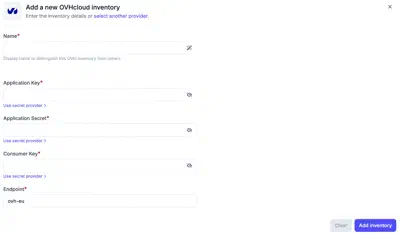
When creating an OVHcloud inventory in Plakar Control Plane, you must provide:
- Name for the inventory
- Application key (AK)
- Application secret (AS)
- Consumer key (CK)
For information on generating these credentials, see Managing API Applications and Credentials.
Required Permissions
Plakar Control Plane requires read access to OVHcloud APIs so it can discover and classify resources during inventory synchronization. All required rights use the GET method only.
When generating credentials through the OVHcloud token creation portal, add the following paths with the GET method:
| Path | Description |
|---|---|
/me |
Reads the account the credentials belong to |
/cloud/project* |
Lists all projects in the account and their resources |
The inventory discovers resources in every project of the account. Restricting the credentials to a single project is not supported. Synchronization still tries to list resources in all projects.
Adding the OVHcloud Inventory
When creating a new OVHcloud inventory, provide the inventory name, application key, application secret, and consumer key. Credentials can be entered directly or loaded from a secret provider.
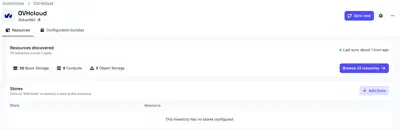
After creating the inventory, trigger a synchronization to discover and load resources from your OVHcloud account. You can run synchronization again at any time to refresh the inventory, for example after creating new instances or object storage buckets in OVHcloud.
All configuration details provided during inventory creation can be updated later by clicking the settings icon in the top right of the inventory page, which opens a settings popup.
Managing Resources
Resources in an OVHcloud inventory are automatically discovered and synchronized. They are managed by the inventory and cannot be manually created or deleted from Plakar Control Plane.
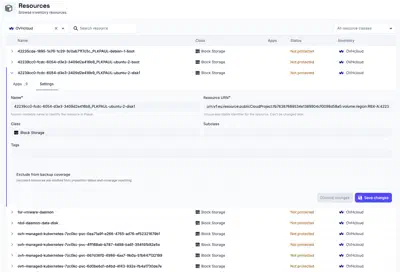
You can expand a resource row to view its details. Each row expands to show two tabs:
- Apps - lists the latest 5 restore points available for this resource, apps associated with the resource, and an option to assign a new app. See the apps documentation on how to set them up on resources.
- Settings - configure the resource, including backup coverage
Backup coverage tracks how many of your resources are protected by backups. If a resource does not need to be backed up, for example a test instance or a temporary bucket, you can exclude it from coverage using the Exclude from backup coverage option in the Settings tab. Excluded resources are omitted from protection status and coverage reporting.