Inventories
An inventory connects Plakar Control Plane to a provider and exposes a list of resources available for management. Resources are the individual entities you can back up, use as storage, or restore to, for example, EC2 instances, S3 buckets, and their equivalents across other supported cloud providers.
Inventories belong to a single organization. You work only with the inventories of the organization you signed in to, and what you can do with them is determined by the permissions you hold there.
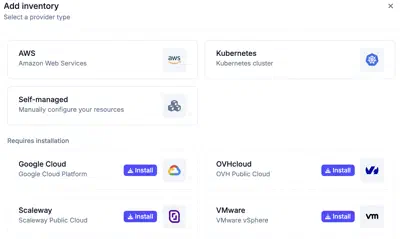
Inventory providers are delivered as integrations. Before creating an inventory, install the required provider from the Integrations page or directly from the Add inventory dialog. The dialog displays providers that are already installed alongside providers that can be installed and used immediately.
Once an inventory is connected, you can attach apps to each resource. Plakar Control Plane supports three app types:
- Source: the resource being backed up
- Store: where backups are stored
- Destination: where data is restored to
Managed inventories
Managed inventories connect to a provider using credentials. Plakar Control Plane discovers the resources in your account and classifies them by type. In an AWS inventory, for example, EC2 instances are classified as compute resources and S3 buckets as storage resources.
The provider is the source of truth. Resources cannot be created or deleted manually in a managed inventory. Synchronize the inventory to pick up changes made in the provider.
Each provider page lists the supported resources and the permissions the credentials need.
Self-managed inventories
Self-managed inventories allow you to add resources manually, either individually or in bulk. This approach is useful when:
- The infrastructure is not supported by managed inventories (e.g., a local MinIO instance)
- You require full control over how resources are defined and managed
Data residency
An inventory can have a residency, which is inherited by every resource it exposes. This gives those resources a country in which their data must remain.
When you configure an operation, PCP only allows resources with the same residency to be used together. For example, resources from an inventory with a French residency can only be backed up to, restored from, or synchronized with resources that also have a French residency.
See data residency for more information.
Configuration bundles
Configuration bundles let you define shared credentials and settings at the inventory level and apply them automatically to matching resources. This avoids having to configure the same credentials individually on each discovered resource. See configuration bundles for details.
Provider-specific instructions
How to connect and manage AWS inventory in Plakar Control Plane.
How to connect and manage OVHcloud inventory in Plakar Control Plane.
How to connect and manage Scaleway inventory in Plakar Control Plane.
How to connect and manage Google Cloud inventory in Plakar Control Plane.
How to connect and manage OVHcloud inventory in Plakar Control Plane.
Connect and manage a VMware inventory in Plakar Control Plane.
How to connect and manage a Self Managed inventory in Plakar Control Plane.