Updating Plakar Control Plane
Plakar Control Plane supports in-place application updates directly from the web interface.
From the Settings page, you can:
- View the currently installed version
- Check whether a newer version is available
- Install updates directly from the UI
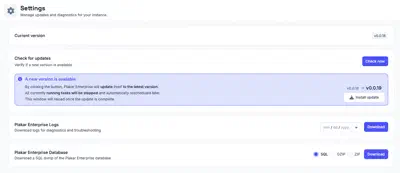
When a new version is available, the settings page will display an update notification with the target version and an Install update action.
During the update process:
- Running tasks are stopped
- Tasks are automatically rescheduled after the update
- The web interface reloads once the update is complete
Note
Most Plakar Control Plane updates only update the application itself and do not require changes to the underlying infrastructure or deployment environment.
Updating an air-gapped Plakar Control Plane
An air-gapped instance cannot reach plakar.io to discover new releases, so the
update notification never appears. Updates are started instead by entering the
target version by hand, from a hidden internal settings page.
Type thisisinternal anywhere in the web interface to open Internal
Settings. The page is not linked from the navigation and holds advanced
settings that are not part of normal operation.
Under Update Plakar Control Plane, enter the version you want to install,
for example v1.1.2, then click Update.
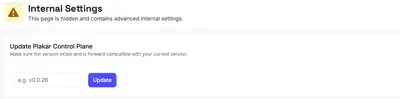
The version must already exist in your releases repository. Versions are tags, and each one corresponds to a directory of the same name in that repository, so mirror a release before entering it here. See hosting a package repository for how that repository is laid out and mirrored.
From there the update behaves as it does from the settings page. Running tasks are stopped and rescheduled afterwards, and the web interface reloads once the update is complete.
Updating the underlying deployment infrastructure
Plakar Control Plane can run on multiple environments including:
- AWS
- OVHcloud
- Scaleway
- On-premises infrastructure
Depending on the platform, Plakar Control Plane may be distributed using different deployment formats such as:
- Virtual machine images
- Cloud marketplace appliances
- Container images
Occasionally, infrastructure-level updates may also be required depending on the deployment platform and distribution method.
For example, on AWS, Plakar Control Plane is distributed as an AMI through AWS Marketplace. Most application updates can be installed directly from the Settings page without replacing the EC2 instance or updating the AMI.
Platform-specific infrastructure update procedures are documented separately:
How to update Plakar Control Plane AMI on AWS.
How to update the Plakar Control Plane Scaleway installation image.
How to update the Plakar Control Plane vSphere installation
How to update the Plakar Control Plane Proxmox installation image.