OpenStack Inventory
The OpenStack inventory allows Plakar Control Plane to connect to an OpenStack cloud and discover resources in a single OpenStack project. Once connected, Plakar Control Plane discovers supported resources in every region the credentials can reach and makes them available for management directly within Plakar Control Plane.
Discovery flow
flowchart TD
  subgraph Plakar["Plakar Control Plane"]
    Inventory["OpenStack Inventory
Discover & classify"]
  end

  subgraph Creds["Authentication"]
    direction LR
    AppCred["Application Credential"]
    UserPass["Username + Password"]
  end

  Keystone["Keystone
Service catalog"]

  subgraph OpenStack["OpenStack Project"]
    Resources["Supported Resources
(every region)"]
  end

  Inventory --> AppCred & UserPass
  AppCred & UserPass -->|"authenticate"| Keystone
  Keystone -->|"OpenStack APIs"| Resources
  Resources -->|"sync to inventory"| Inventory
Supported Resources
| Resource | Source | Store | Destination |
|---|---|---|---|
| Block Storage (Cinder volumes) | Yes | No | Yes |
| Compute (Nova servers) | Yes | No | Yes |
| Object Storage (Swift containers) | No | No | No |
| Images (Glance images) | No | No | No |
| Database (Trove databases) | Yes | No | Yes |
Only the Glance images owned by the project are discovered.
Authentication
OpenStack inventories authenticate against Keystone, the OpenStack identity service. Keystone returns the service catalog, which lists the endpoints and regions available to the project. Two authentication methods are supported:
- Application credential (recommended): a credential created for a single project with a restricted set of roles. It can be revoked without affecting the user account it was created from.
- Username and password: the credentials of an OpenStack user. The project must be specified separately.
An application credential is bound to the project in which it was created, so the inventory discovers resources in that project and no project needs to be specified. It can only carry roles that the user creating it already holds on the project.
With a username and password, the project to scan is identified by its ID or name. If both are provided, the project ID takes precedence. The domain applies to the user, and to the project when it is identified by name.
Required Permissions
Discovery only reads the project, so the credentials need the reader role on
it. See
Managing Users and Application Credentials
for how to create a user and an application credential with that role.
Role names depend on how the OpenStack cloud is configured. The reader role is
one of the default Keystone roles, but some providers define their own. Consult
the documentation of the provider for the role that grants read access.
Creating an OpenStack Inventory
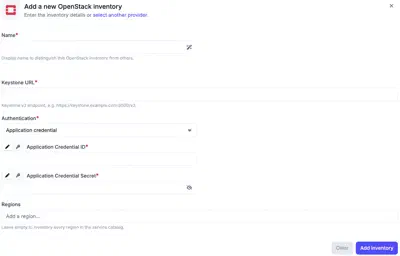
An OpenStack inventory needs a Name, the Keystone URL of the Keystone v3
endpoint, for example https://keystone.example.com:5000/v3, and an
Authentication method with its credentials. Credentials can be entered
directly or loaded from a secret provider.
With Application credential, the inventory takes the Application Credential ID and Application Credential Secret. With Username and password, it takes the Username, Password and Domain, and either a Project ID or a Project name.
Regions is optional. Left empty, the inventory discovers resources in every
region listed in the Keystone service catalog. Providing one or more region
names, for example RegionOne or GRA11, limits discovery to those regions.
An inventory discovers its resources when it is synchronized, so a new inventory is empty until its first synchronization. Synchronizing again refreshes the inventory, for example after instances or volumes are added to the project.