Edge Enrollment
An edge joins an organization by enrolling into one of its edge pools. On its first connection to PCP, it presents the enrollment key of the pool, and PCP exchanges the key for an authentication token. The edge stores the token locally and uses it for every later connection, so it no longer depends on the key. Closing enrollment or regenerating a key therefore stops new edges from joining with the old key, and has no effect on the edges that are already enrolled.
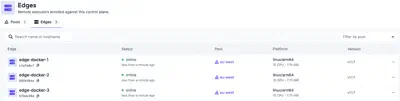
The key is passed to the edge when it starts for the first time, as described in Edge Installation. You work with the edges available to the organization you signed in to, and what you can do with them is determined by the permissions your application user has on the organization.
Edge pools
Edge pools are groups of edges that can run the same tasks, for any of the uses described in When to use an edge. Every edge belongs to exactly one pool. Tasks do not select an edge. Pools are assigned to inventories, and to individual resources when needed, and every task that uses a resource assigned to a pool runs on one of the edges of that pool.
Because tasks follow the pool rather than a specific edge, the edges in a pool can change without touching any task or schedule. Edges can be added to handle more work, or replaced, and tasks keep running as long as at least one edge of the pool is online.
A resource inherits the pool of its inventory, unless it sets its own. How PCP picks an edge, and what happens when none is available, is described in Selecting an edge.
Creating and managing pools
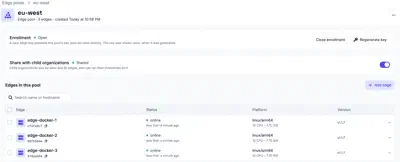
Pools are created on the Pools tab of Infrastructure > Edges. Each pool has its own enrollment key. An edge that presents this key on its first connection is enrolled into the organization and placed in the pool in the same step.
The key is shown only once, when it is generated. A pool has one key at a time, so generating a new one invalidates the previous one. Closing enrollment removes the key, and no new edge can join the pool until a key is generated again. Neither change affects the edges that already enrolled.
Edges enrolled before pools were introduced, without a pool, have been placed in
a pool named default, which is the organization’s default pool.
An edge can be moved to another pool of the same organization, by adding it to that pool. It cannot be taken out of its pool, since every edge belongs to one. A child organization can only move or add its own edges. The edges of a pool shared by an organization above it cannot be moved or added to its pools.
Sharing pools with child organizations
A pool is visible only to the organization that owns it until it is shared. Enabling Child organizations on a pool shares it with every organization below the owner, at any depth. An organization therefore sees its own pools and the shared pools of all the organizations above it.
A child organization can assign a shared pool to its inventories and resources, and their tasks then run on the edges of that pool. The edges of a shared pool appear in its list of edges alongside its own. Only the organization that owns the pool can manage it, its edges and its enrollment key.
Only the owning organization can share a pool or stop sharing it. Sharing cannot be stopped while an inventory or a resource of another organization still uses the pool. Assign them to another pool first.