Troubleshooting
The appliance downloads its components from plakar.io and from container
registries when it starts, so it needs outbound access to those hosts. Most
appliances that fail to start are on a network where a firewall or forward proxy
blocks one of them. The appliance includes a diagnostic tool, doktor, that
checks this access and reports what is blocked.
Running doktor
doktor is a command on the appliance. Connect over SSH as the plakar user,
with the key supplied when the appliance was deployed, and run it:
ssh plakar@<appliance-ip-address>
doktor
The report checks the appliance clock, its network configuration, DNS, the proxy and registry mirror settings, and whether every required host is reachable. It ends with a summary that names each failing host and what to change. Proxy credentials are redacted, so the report can be attached as is when contacting support.
The Google Cloud image does not accept SSH connections, so doktor is not
available there. See the
Google Cloud limitations.
Outbound access
A host the appliance cannot reach is the most common reason it fails to start. The domains a proxy or firewall has to allow are listed in Required outbound access.
The appliance also needs to reach an NTP server over UDP port 123, which does
not go through a forward proxy. Without one, its clock drifts until HTTPS
connections fail with certificate errors. On a network that blocks
pool.ntp.org, set internal servers as described in
NTP servers.
Appliance without a data disk
The database, logs and all Control Plane state live on a second disk, which the appliance formats on first boot, as described in Appliance Sizing. An appliance created without it keeps that state in memory. Everything appears to work until the appliance powers off, and then all of it is lost. When Plakar Control Plane detects no data disk, it shows a warning in the web interface.
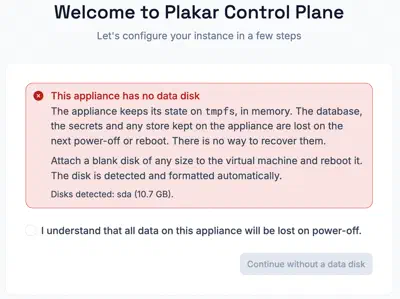
To fix it, attach a blank disk of the size given in Appliance Sizing and reboot. The appliance detects, formats and uses it automatically. Nothing from the previous boot can be recovered.