Inventories
An inventory holds the resources that Plakar Control Plane can manage. A resource is an individual entity that can be backed up, used as storage, or restored to, such as an EC2 instance or an S3 bucket. A managed inventory discovers its resources from a provider, while a self-managed inventory holds resources defined by hand.
Each inventory belongs to one organization. Only the inventories of the organization you are signed in to are visible, and the permissions held in that organization determine what can be done with them.
Inventory providers are delivered as integrations, so a provider must be installed before an inventory can use it. Providers can be installed from the Integrations page or from the Add inventory dialog, which lists installed providers alongside those available to install.
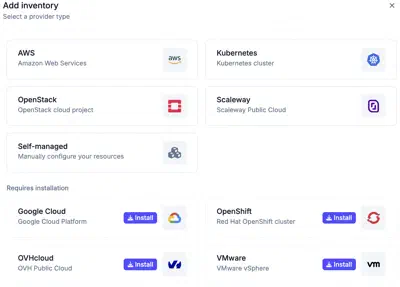
Managed inventories
A managed inventory connects to a provider with credentials and discovers the resources of the account, classified by type. The provider is the source of truth. Resources cannot be created or deleted by hand in a managed inventory, and changes made in the provider appear at the next synchronization.
Inventory Synchronization
Plakar Control Plane synchronizes a managed inventory in the background, listing the resources of the provider again on a fixed period. The period is set per inventory, in the Synchronization section of its settings, and defaults to 900 seconds, or 15 minutes. The minimum is 30 seconds. A shorter period picks up new resources sooner, at the cost of more calls to the provider API. A synchronization can also be started at any time with Sync now, without waiting for the next period.
Self-managed inventories
A self-managed inventory holds resources that are added by hand, one at a time or in bulk from a CSV file. It covers infrastructure that no managed inventory discovers, such as a local MinIO instance or a self-hosted database.
Resources
An inventory exposes its resources, each with a class, subclass, tags, and the endpoints and attributes that identify where it is reached. A managed inventory discovers them from the provider, and they cannot be edited. In a self-managed inventory, they are entered with the resource. See Resource Types for what a resource carries and how it is used, and Filtering resources for narrowing the list.
A new inventory has no resources yet. A managed inventory that has never been synchronized offers Sync now, which starts its first synchronization. A self-managed inventory with no resources offers Add resource, described in Adding resources. Both actions are unavailable without the permission to change the resources of the inventory.
Data residency
An inventory can have a residency, which is inherited by every resource it exposes. This gives those resources a country in which their data must remain. A residency set on an individual resource takes precedence over the inherited one. See Residency for how it restricts the resources that can be used together.
Edge pools
An inventory can name an edge pool, which is inherited by every resource it exposes. Tasks that use those resources run on an edge of the pool instead of on the Control Plane. A pool set on an individual resource takes precedence over the one inherited from the inventory.
The inventory itself is also synchronized through the pool. An edge of the pool lists the resources from the provider and sends the results back to PCP. This lets an inventory cover resources the Control Plane cannot reach directly, such as resources behind a private network, as long as an edge of the pool can reach them. When no edge of the pool is available, the synchronization fails rather than running on the Control Plane.
Configuration bundles
Configuration bundles declare shared fields, such as credentials, that are filled in when an app is set up on a matching resource of the inventory. See configuration bundles for details.