



TL;DR:
Plakar now backs up and restores MongoDB. Install one package, point it at your server, and every backup is encrypted, deduplicated and stored away from the database. It is our first NoSQL database, after PostgreSQL, MySQL / MariaDB and SQL Server. Like our PostgreSQL and MySQL connectors, it is open source.
Schemaless is not backupless
MongoDB lets you change your data model without a migration. That is great until
someone runs db.orders.drop() on the wrong cluster.
Replica sets do not help here. They keep you online when a node dies, but a
dropped collection or a bad updateMany reaches every secondary in
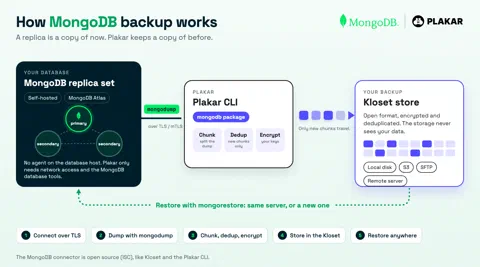
milliseconds. A replica is a copy of now. A backup is a copy of before.
So most teams end up with the same thing: mongodump in a cron job, a folder of
archives, and no one sure the last one restores.
We already fixed that for SQL databases with our PostgreSQL, MySQL / MariaDB and SQL Server integrations. MongoDB is the first document database to join them.
How it works
Plakar runs mongodump against your server, over TLS by default. It works with
self-hosted servers and with MongoDB Atlas (mongodb+srv:// URLs). It cuts the
dump into chunks, keeps only the chunks it has not seen before, then compresses
and encrypts them into a
Kloset store. Keys stay on
your side. The storage only sees encrypted data.
Restore is the same path in reverse, with mongorestore, to the same server or
a new one.
A few things NoSQL folks will like:
- No agent on the database host. Plakar needs network access and the MongoDB
database tools (
mongosh,mongodump,mongorestore). That is it. - Nightly dumps stay small. Most documents do not change between two nights, so most chunks are already in the store.
- Custom CA, mutual TLS and auth mechanisms. For clusters that only accept client certificates or a specific auth method.
- Backups outside the blast radius. Store them on S3, SFTP or disk, far from the cluster and the credentials that manage it.
Get started
Pre-built packages need a free Plakar account:
plakar login
plakar pkg add mongodb
Back up:
plakar source add my-mongodb \
  location=mongodb://db.example.com \
  username=backup \
  password=<YOUR_PASSWORD>

plakar at /var/backups backup "@my-mongodb"
Restore (careful: it runs mongorestore --drop, so existing collections in the
target are replaced by the snapshot):
plakar destination add my-mongodb-restore \
  location=mongodb://target.example.com \
  username=admin \
  password=<YOUR_PASSWORD>

plakar at /var/backups restore -to "@my-mongodb-restore" <snapshot_id>
All options are in the MongoDB docs.
Open source
The MongoDB connector is open source like the PostgreSQL and MySQL ones.
Tell us which database you want next on Discord. Redis? Cassandra? We are listening.
Happy hacking,